
One workspace per client. Context that does not cross over.
A multi-client platform for an agency needs one workspace per client, holding that account’s files, history and decisions, so nothing has to be re-explained and nothing bleeds between accounts. Multiply structures agency work that way by default: org, workspace, project, task.
Twelve clients, one assistant, no memory
An agency running on a general assistant starts every session from nothing. Your strategist re-pastes the brand guidelines. Your creative re-explains the market. Your account lead uploads the same deck for the fourth time this month. None of it accumulates, and nothing keeps one account’s context out of another except whoever remembers to open a new chat.
One system, not another tool.
AI assistants answer one question at a time. Project tools keep track of the work. Multiply is where the work happens, with your clients, your calls and your process already inside.
| AI assistantsChatGPT, Claude | Project toolsAsana, Monday | Multiply | |
|---|---|---|---|
| A living workspace for every client | No | Partly | Yes |
| Remembers every call, file and brief | Partly | No | Yes |
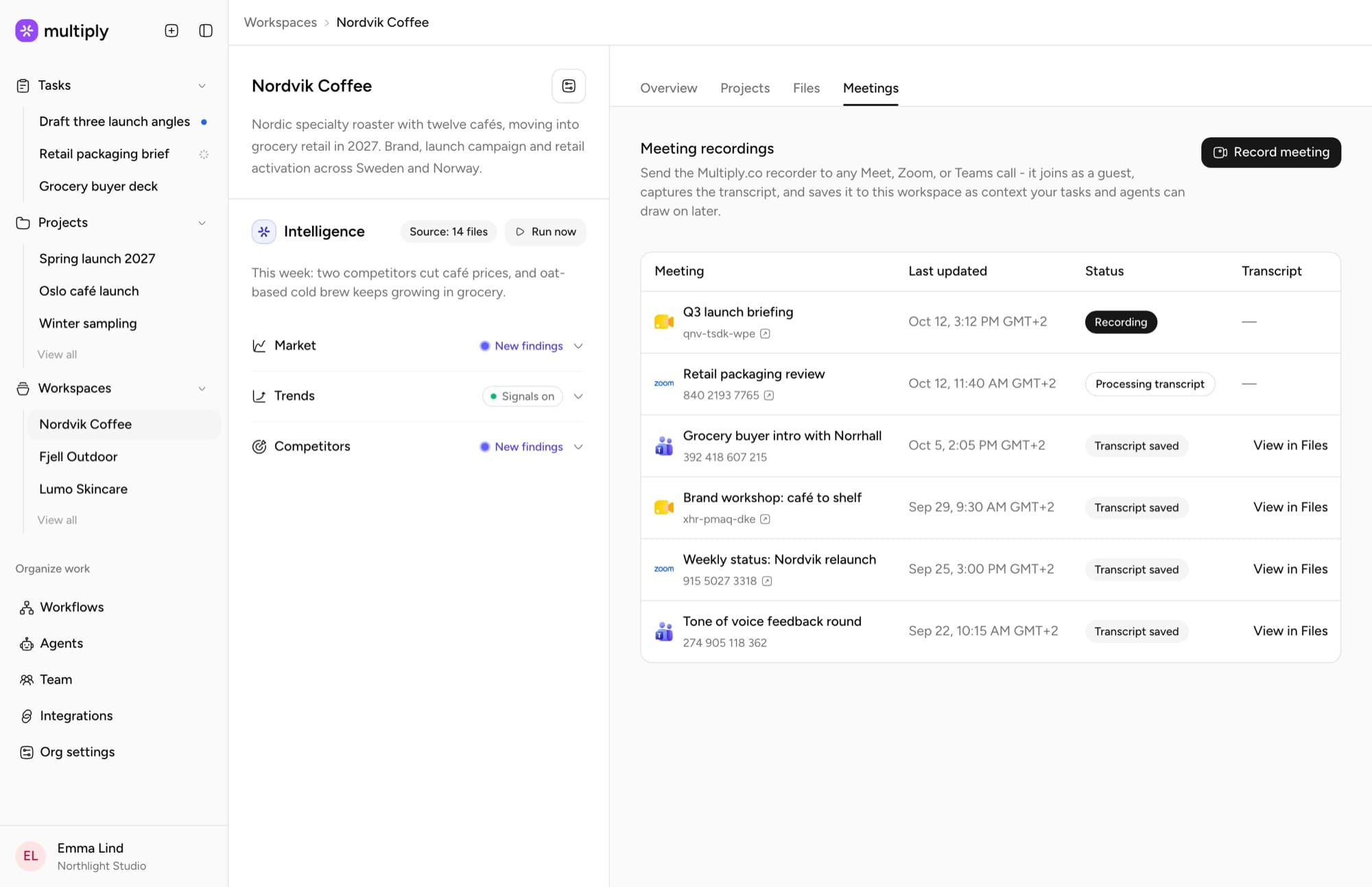
| Records client meetings and files them by client | No | No | Yes |
| Search 250,000 award-tagged campaigns | No | No | Yes |
| Agents that work on their own, on a schedule | Partly | Partly | Yes |
| Built for agency work: briefs, pitches, clients | No | No | Yes |
| Know-how your agency owns, and that compounds | No | No | Yes |
| Every client’s data kept apart | No | Partly | Yes |
Already use ChatGPT or Claude? Keep them. Multiply plugs in through MCP.
Four levels, one client context.
You set a client’s context once, at the level it belongs to, and every project underneath works from it.
Context flows downLearnings flow back up
Your agency
- Organisation profileSet once by your admins
- Global instructionsEvery agent surface inherits them
- Your team12 people, every agent
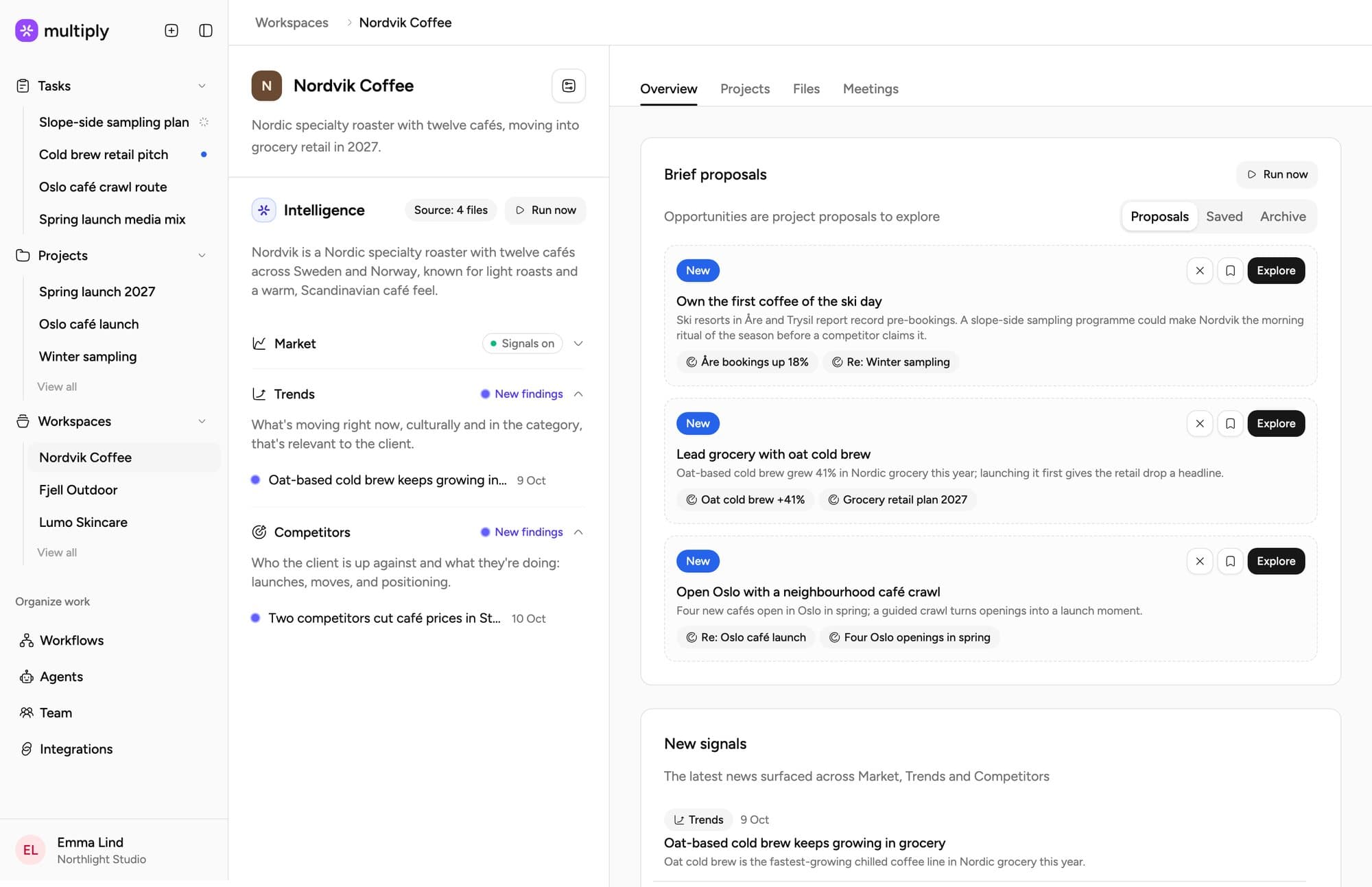
Nordvik Coffee
- Brand guidelinesGuidelines, tone, assets
- Strategy documentsSteer everything underneath
- Account historyCalls, all searchable
- Audience and marketUpdated from 14 sources
- Client newsLive
- Brief proposals3 this week
Spring launch 2027
- BriefApproved by Jonas
- PlanWeek 12 retail drop
- Inherits the workspaceIts context as background steering
Draft three launch angles
- Weighted mostWork sessions carry the most weight in what comes back
- GroundedWorkspace and project context ground every session
- Learnings flow backWhen a project closes, what it learned can enrich the workspace profile
Every client gets an always-on Account Manager.
It keeps you closer to what they need, working from that client’s own calls, files and brand voice, and nothing from any other account.
Hi Jonas, week 12 works. We've moved the shoot and the retail drop to match, and the sampling plan will be with you on Thursday. The updated timeline is attached.
Days of work, down to hours.
Measured on real workflows at partner agencies.
 20x
20xfaster campaign development
- Before Multiply40 hoursWith Multiply2 hours
 24x
24xfaster briefs and debriefs
- Before Multiply48 hoursWith Multiply2 hours
 12x
12xfaster from brief to proposal

What stays out of the shared profile
Multiply splits data by where it came from. Private sources such as email and meeting recordings stay in your own work sessions. Organisational sources feed the workspace profile your team works from.
- One workspace per clientAgents only see the client they're working for.
- No training on your dataNo AI model is trained on anything you bring.
- EU data residencyYour data is stored and processed in the EU.
- GDPR compliantISO 27001 in progress, SOC 2 targeted.
What agencies ask before they switch
Anything specific to your practice is easier to answer on a walkthrough.
An agency needs each client’s context to persist between sessions and to stay scoped to that client. Multiply does this with workspaces: one per client or market, holding the files, brand guidelines and account history that steer every project underneath.
General assistants remember everything in one undifferentiated pile. Project tools separate clients but hold no context an AI can use. Agency work sits between the two.
The underlying capability has its own page — agency operations software — and the wider category comparison is in the buyer's guide.
No. Multiply does not buy, traffic or report on media. It is an Agency Operating System for the work around the media: research, strategy, briefs and creative development, organised per client.
Agencies looking to manage ad accounts across clients need a different category of tool. Agencies looking for one place where the thinking behind those campaigns accumulates are in the right place.
Those are the tools most agencies already run on, usually with a consultant alongside. They produce good work and they forget it. Every session opens on an empty context, each person keeps a private chat history, and nothing carries a client label.
Multiply supplies the structure around the model: persistent workspaces per client, shared context your whole team works from, and agents that inherit that context rather than waiting for someone to paste it in again.
A workspace can represent a market as easily as a client, so an agency running one brand across the Nordics holds each market’s context separately while sharing what sits above it at organisation level.
Multiply is GDPR compliant and does not train models on customer data. ISO 27001 is in progress and SOC 2 is targeted. The security page carries the detail a review usually asks for, and anything specific to your client contracts is worth raising on a walkthrough.
See it running on one of your accounts
Tell us how your agency runs today and we will show you where this fits.